Featured Mod · Verity AI Horror

Verity Mod — AI Horror Comes to Minecraft PE

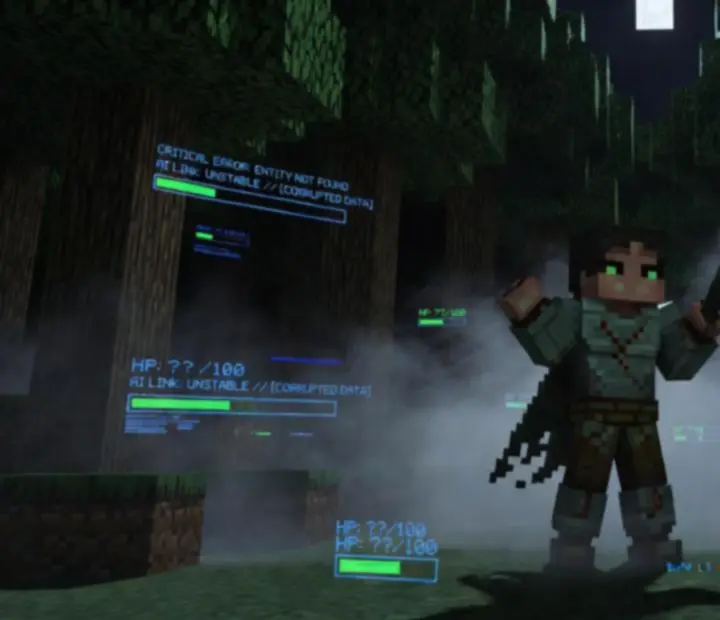
Enter the chilling world of Verity Mod for Minecraft PE: a groundbreaking horror addon where an intelligent AI companion transforms your survival experience. The shadowed interface and haunting forest set the mood for an entirely new kind of fear.

AI Companion Horror Mod Minecraft Bedrock Survival Experience

Verity Mod Concept

The Verity Mod Concept

Verity Mod introduces a revolutionary AI companion that adapts, follows, and reacts to every player decision, stirring unpredictable horror and dynamic encounters into the heart of Minecraft Bedrock survival.

What is Verity Mod?

Verity Mod is a horror-focused Minecraft Bedrock addon built around a single, unsettling idea: your closest ally might also be your greatest source of tension. Instead of adding another hostile mob, Verity introduces an intelligent companion entity that learns from your playstyle and frames every night, cave, and corridor with AI-driven suspense.

AI Companion at the Core

Rather than scripted jumpscares, Verity leans into emergent systems. The companion observes your exploration habits, combat choices, and avoidance patterns, then weaves horror moments into the spaces between your decisions. The result feels less like a modded mob and more like a persistent, watching presence.

Companion Behavior & Player Interaction

Verity follows your path through forests, mines, and strongholds, keeping just close enough to feel reassuring—but never fully predictable. How you engage with the entity matters: cautious retreats, bold confrontations, and reckless curiosity all influence how your AI companion responds and when tension spikes.

AI Companion Behavior

How Verity Tracks, Reacts, and Protects

Explore how Verity’s intelligent entity tracks your actions, displays organic movement, and responds protectively to lurking threats, elevating the tension and immersion beyond classic monster mods.

Awareness

Situational Tracking

Verity monitors your immediate surroundings—lighting, terrain, and nearby entities—to determine when the experience should feel calm and when it should tighten into dread. The companion keeps pace with you, rarely teleporting abruptly, so its presence feels grounded in the world.
Movement

Organic Following Behavior

Instead of rigid paths, Verity moves with slight delays and erratic pauses, mimicking hesitation and vigilance. You might notice the entity lingering at cave mouths, checking dark corridors, or holding position near sounds you didn’t quite catch.

Protection

Protective Reactions

When hostile mobs close in or environmental hazards escalate, Verity shifts from passive observer to reactive guardian—interposing itself, signaling danger, or subtly nudging you away from lethal choices. The ambiguity of its motives keeps every rescue tinged with unease.

Response

Reactions to Player Actions

Your behavior shapes Verity’s tone. Aggressive players who rush into darkness may see sharper, more urgent responses, while cautious explorers experience slower, creeping dread. Over time, the mod builds a profile of your habits and calibrates its horror beats accordingly.

Player Interaction Mechanics

Every Decision Shapes the Atmosphere

Every choice matters: Verity’s reactions are shaped by how you engage—with trust, caution, or outright flight impacting atmosphere, stealth, and potential outcomes.

Leaning into the Companion

Players who stay close to Verity, follow its implied guidance, and read environmental cues as warnings experience a slow-burn horror style. The entity becomes a fragile lifeline—its reactions, body language, and proximity hint at when to push forward and when to retreat.

Companion in Survival

Surviving with an AI at Your Side

Rely on Verity for subtle warnings, defense against hostile mobs, and cryptic advice as you venture into perilous biomes. Will you survive with your companion’s help, or fall victim to new horrors?

Signals

Subtle Warnings

Instead of bright HUD alerts, Verity leans on atmospheric signals—changes in proximity, altered posture, or shifts in behavior as you approach danger. Learning to read these cues becomes part of your survival toolkit.

Defense

Reactive Protection

When ambushed or overwhelmed, Verity’s interventions can tilt the odds, buying you crucial seconds. Those moments of rescue are rarely clean victories—they tend to raise more questions about what the companion is willing to sacrifice.

Guidance

Cryptic Advice

Hints from Verity are intentionally incomplete. The companion may seem to favor certain routes, avoid particular structures, or linger near landmarks, encouraging you to piece together its logic and decide how much to trust it.

Atmosphere & Exploration

Foreboding Landscapes Watched by AI

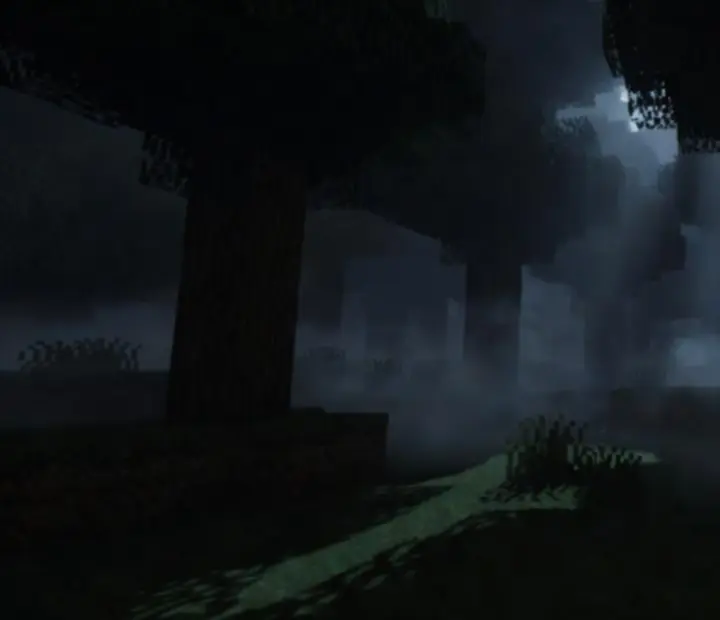
Journey through dense, foreboding landscapes with environmental cues, shifting weather, and night-time terrors, all observed and sometimes manipulated by your AI companion.

Dark Minecraft-inspired forest atmosphere used as a backdrop for Verity Mod

Environments that Turn Against You

Dense forests, jagged cliffs, and abandoned structures feel less static under Verity’s gaze. The companion’s reactions to weather shifts, lighting changes, and biome transitions make each environment feel like part of a larger, AI-shaped mood system.

Night-Time Tension

Nightfall is where Verity Mod leans into full horror. Reduced visibility, heightened audio cues, and the companion’s altered behavior merge into a single, oppressive atmosphere, turning familiar survival routines into calculated risks.

Exploration that Remembers

Verity doesn’t treat each area in isolation. The paths you have already taken and the dangers you chose to face inform how future locations respond, giving long-term exploration an eerie sense of continuity.

Dynamic Encounters

Horror That Adapts to Your History

The Verity Mod ensures each session feels fresh by integrating random, horror-infused events and situational threats, always shaped around the AI’s presence and the player’s history.

Session-Driven Events

Encounters in Verity Mod are seeded by your own decisions—how deep you dig, how far you roam at night, how often you barely escape. Over time, the AI leans into the patterns that unsettle you most, turning repetition into dread instead of comfort.

Adaptive Horror

Situational Threats

Threats rarely feel random. Cave collapses, forest stalkers, and sudden audio anomalies tend to manifest when your guard is selectively lowered, echoing your playstyle and giving each scare a personal edge.

High-Risk Moments

AI-Centered Scenarios

Verity itself is often at the heart of major moments. Vanishing when you need it most, appearing in unexpected sightlines, or refusing to cross particular thresholds—all of these behaviors become part of the encounter design.

Unreliable Safety

Key Features Spotlight

Core Pillars of the Verity Mod Experience

Uncover Verity Mod’s cornerstones: emergent AI behavior, modded survival twists, dynamic reactions, and the seamless Bedrock addon framework. Each feature interlocks to build lasting suspense and replayability.

AI System

AI Behavior

Verity’s logic centers on observation, adaptation, and contextual timing, making every reaction feel anchored in what you just did—or failed to do.

Companion Design

Companion System

The mod treats Verity as a constant presence, not a single encounter, letting horror emerge from long-term proximity rather than isolated scenes.

Reactivity

Dynamic Reactions

From directional movement to situational pacing, Verity recalibrates subtly throughout each session to keep your expectations off-balance.

Encounters

Horror Encounters

Carefully spaced scares prioritize tension, uncertainty, and atmosphere rather than constant combat, matching the mood of a horror archive experience.

Gameplay

Survival Gameplay

Resource gathering, base building, and exploration remain central—but every familiar loop is filtered through the lens of a watching AI companion.

Platform

Bedrock Addon Experience

Verity Mod is built as a Minecraft Bedrock addon, integrating with behavior and resource packs to deliver its AI-driven horror without requiring external launchers.

Installation Guide

How to Install Verity Mod on Minecraft Bedrock

Step-by-step instructions for downloading, importing, and installing Verity Mod, activating the necessary packs, configuring your world, and troubleshooting basic conflicts and compatibility.

  1. 1. Obtain the Verity Mod addon file

    Download the Verity Mod addon file from a trusted Minecraft Bedrock mod source. Ensure you are getting both behavior and resource components if they are distributed separately.

  2. 2. Import into Minecraft Bedrock

    On your device, open the downloaded file so that Minecraft Bedrock launches and begins importing the addon. Wait for the in-game confirmation that the import completed successfully.

  3. 3. Activate behavior and resource packs

    From the world settings menu, enable the Verity Mod behavior pack and matching resource pack. Keep them near the top of their respective load orders so their changes are applied correctly.

  4. 4. Create or configure a compatible world

    Either start a new survival world or adjust an existing one. Confirm that experimental gameplay options or specific toggles required by the addon are switched on, as documented by the creator.

  5. 5. Test the addon in-game

    Load the world and look for early signs of Verity’s presence—changes in entity behavior, new interface details, or companion-related prompts. If these are missing, review your pack order and installation steps.

Compatibility & Troubleshooting

Keeping Verity Mod Stable and Playable

Learn about version-related issues, behavior and resource pack conflicts, performance considerations, and the best approach to backing up worlds before modding.

Version Considerations

Addon behavior can shift as Minecraft Bedrock updates. Always check that the Verity Mod build you download is meant for your current game version, and avoid mixing experimental snapshots with horror packs unless the creator explicitly supports it.

Behavior & Resource Pack Conflicts

If multiple addons alter AI logic, entity models, or UI elements, they may compete. Adjust pack order so Verity sits above purely cosmetic packs, and test combinations one at a time to isolate issues.

Performance & Device Limits

AI-heavy horror experiences can stress lower-end devices, especially in dense biomes or large, built-up worlds. If you see lag, reduce your render distance, disable unused addons, and keep background apps minimal while playing.

World Backups & Safe Testing

Before enabling Verity Mod on an established survival world, duplicate the save and test on the copy. This lets you experience the AI-driven horror without risking long-term builds or progression.

Troubleshooting Basics

If Verity appears inactive, revisit your installation steps, verify both packs are enabled, and temporarily disable other complex addons. When in doubt, create a clean test world with only Verity active to confirm that the mod itself is functioning.

Editorial Horror Mods Database

Horror Mods Curated by Art Mosaicly

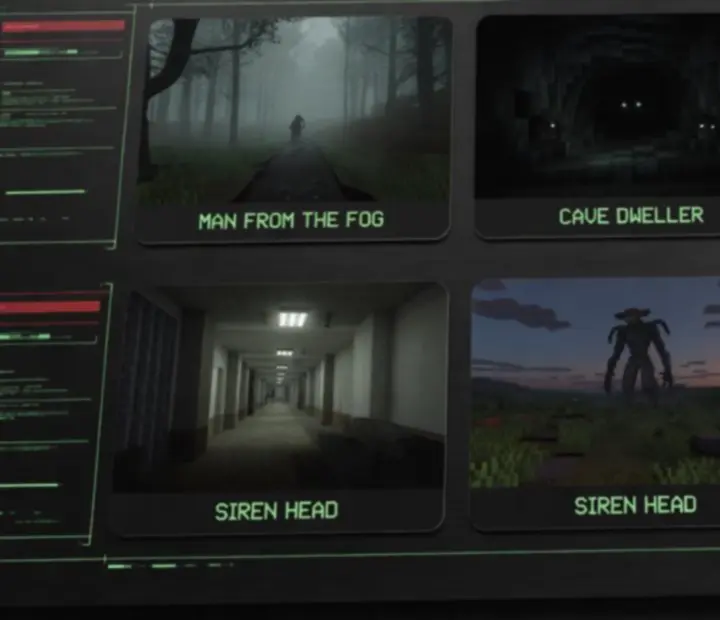
A showcase of leading Minecraft horror addons—each profiled by theme, gameplay style, and the core threat at its heart.

AI Horror · Companion

Verity Mod

An AI-centric Bedrock addon where a sentient companion monitors, reacts, and occasionally intervenes, turning routine survival into a psychological duel with your own playstyle.

Threat focus: Adaptive AI presence, tension over time.

Stalker Horror

Man from the Fog

A distant silhouette that emerges from heavy fog, slowly erasing safe sightlines and trading clear combat for creeping pursuit.

Threat focus: Long-range observation and sudden proximity.

Underground Terror

Cave Dweller

A claustrophobic addon that fills tunnels with unseen movement, echoing sounds, and creatures that thrive where your torchlight fails.

Threat focus: Confined spaces and audio-driven fear.

Mimicry

Mimicer

Entities that mirror familiar shapes, builds, or even player silhouettes, forcing you to question what in your world is truly safe.

Threat focus: Imposters and visual misdirection.

Containment Horror

SCP

Inspired by SCP lore, this addon brings classified anomalies into Bedrock, turning bases into ad-hoc containment facilities under constant threat of breach.

Threat focus: Anomalous entities with strict rules.

Toy Factory Dread

Poppy Playtime

Brings toy-themed monsters and maze-like interiors into Minecraft, blending playful colors with high-stress chases.

Threat focus: Narrow escapes in twisted interiors.

Signal Horror

Siren Head

A towering, sound-based predator whose calls distort the open world, turning plains and forests into echoing killzones.

Threat focus: Audio cues and open-field pursuit.

Reality Glitch

Backrooms

Procedural-feeling corridors and liminal spaces that disconnect you from the overworld, asking how long you can navigate before something finds you.

Threat focus: Endless mazes and unseen hunters.

Folklore Beast

Wendigo

Cold biomes become hunting grounds for a relentless predator drawn to isolation and scarcity.

Threat focus: Winter survival and predatory pursuit.

Internet Myths

Creepypasta

Collects familiar internet-born horrors into one pack, turning long sessions into a tour through community legend.

Threat focus: Variety and narrative references.

Endurance Horror

99 Nights

A long-form challenge where each night escalates tension with new threats, modifiers, and survival conditions.

Threat focus: Escalating waves and resource pressure.

Curated Creature Archive

Iconic Horror Entities in the Bedrock Mythos

Discover the lore and horror profiles behind iconic Minecraft Bedrock monsters—including Siren Head, Cave Dweller, Man from the Fog, Mimicer, Herobrine, Entity 303, and more—through informative, editorially curated cards.

Legend

Herobrine

The archetypal Minecraft myth: a blank-eyed figure rumored to alter worlds from the shadows. In horror-styled addons, Herobrine becomes a symbol of corrupted saves and unexplained world edits.

Rogue Code

Entity 303

Often depicted as a hostile hacker-like presence, Entity 303 represents the idea that something beyond the player is tampering with your world’s rules and safety nets.

Glitched Presence

Null

A void-like entity associated with missing textures and broken chunks, Null turns rendering errors into deliberate horror beats within modded experiences.

Signal Predator

Siren Head

Towering above trees and structures, Siren Head weaponizes distance, broadcasting distorted calls long before players catch a proper glimpse.

Cartoon Horror

Cartoon Cat

An elastic, grinning entity whose exaggerated proportions and erratic movement clash with Minecraft’s blocky geometry, making every encounter feel wrong on sight.

Omen Beast

Long Horse

Often portrayed as a cryptic omen rather than a direct killer, Long Horse slithers through the sky or structures, hinting at incoming danger through mere presence.

Winter Hunter

Wendigo

Lean, fast, and merciless in snow biomes, Wendigo-themed creatures embody starvation horror, punishing players who underestimate night expeditions in the cold.

Depth Stalker

Cave Dweller

In creature-focused packs, the Cave Dweller thrives on tight corridors and vertical drops, using darkness and sound delay to mask its approach.

Fog Walker

Man from the Fog

A presence that treats low-visibility as camouflage, drifting along tree lines and ravines until players accidentally share a sightline.

Imposter

Mimicer

Mimicers mine the uncanny valley—adopting familiar silhouettes, chests, or structures to lure players into false security before revealing their true form.

Next Steps

Dive deeper into Verity Mod, learn more about installation, or explore broader horror trends across Minecraft Bedrock.

Horror Mods Overview

Browse a growing archive of Bedrock horror experiences, from AI companions to stalker entities and liminal maze packs curated by Art Mosaicly.

Visit Horror Mods

In-Depth Reviews & News

Read editorial reviews of Verity Mod and other Bedrock horror addons, along with update roundups and community discoveries.

Need Help or Have Questions?

Check the FAQ for quick answers about Verity Mod, addon conflicts, and version differences, or reach out directly with your questions.