Support · Knowledge Base

Frequently Asked Questions

Explore answers to the most common questions about Verity Mod, Minecraft Bedrock horror addons, installation, and survival gameplay so you can tune your next nightmare run with confidence.

Verity Mod & AI Companion

Verity · Overview

What is Verity Mod?

Verity Mod is a horror-themed Minecraft Bedrock (PE) addon that introduces an AI-powered companion designed to stalk the edges of your survival runs. Instead of a passive pet, Verity interprets your actions, the environment, and nearby threats to create tense, reactive, and dynamic scenarios that do not exist in standard Minecraft. The AI can turn a quiet cave into a paranoid descent or a routine night into a calculated game of trust and fear.

Verity · AI System

How does the AI companion work?

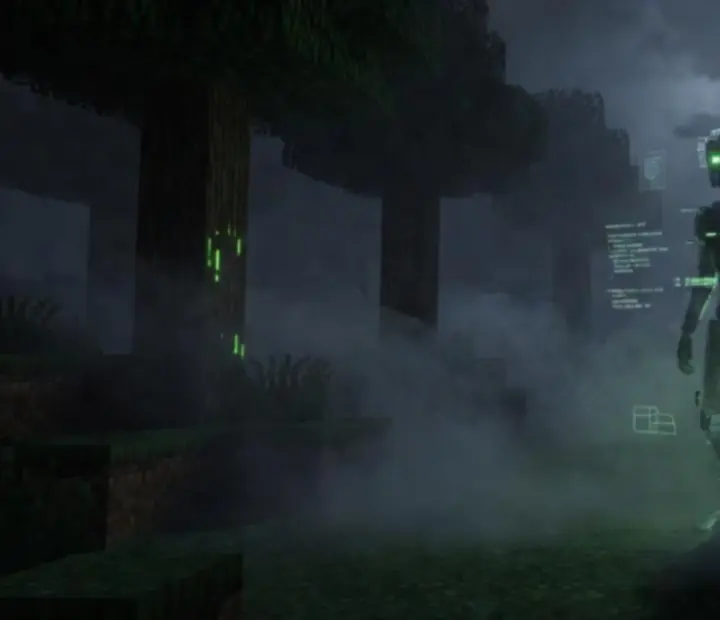
Stylized AI companion silhouette watching the player in a dark Minecraft-like forest

Verity’s AI companion uses intelligent behavior routines to follow, assist, and interact with you while monitoring your decisions and nearby dangers. It can step in to distract threats, hang back when you sprint into danger, or react nervously when something unseen enters the area. These reactions are intentionally helpful yet unpredictable, making Verity feel like an uneasy ally and a key driver of the mod’s escalating horror atmosphere.

Platforms · Bedrock

Is Verity Mod designed for Minecraft Bedrock?

Yes. Verity Mod is specifically engineered for Minecraft Bedrock Edition, including the mobile Pocket Edition (PE) and other Bedrock-supported platforms. Its systems are built to work within Bedrock’s behavior and resource pack framework, with performance and controls tuned for touch devices and console-style play where possible.

Setup · Stability

Installation, Conflicts & Compatibility

Get your Bedrock horror stack running smoothly by following safe install habits, checking compatibility, and understanding how multiple addons interact.

How do I install a Bedrock addon?

To install a Bedrock addon, download the provided .mcaddon file, then open it on your device to import it directly into Minecraft. Once it has been added to the game, enable the associated behavior and resource packs in your world settings before you start playing.

Always back up any important worlds before you add new mods, especially horror-focused packs that change entities, AI, or world rules.

Can multiple horror addons conflict?

Yes. Conflicts are common when multiple horror addons try to modify the same entities, sounds, animations, or core behavior files. Symptoms can include missing textures, broken AI, sudden performance drops, or incomplete encounters where creatures do not behave as intended.

Introduce new mods one at a time, test them in a dedicated world, and only then layer additional addons to see how they interact.

What should I check before installing a mod?

Before installing any horror addon, confirm that it targets your current Minecraft Bedrock version, review the creator’s install notes, and check for required dependency packs. Keep recent backups of your important worlds and note which addons are active so you can roll back if something breaks.

Monitoring update logs and changelogs helps you spot breaking changes early, especially after major Bedrock updates.

Why can compatibility differ between versions?

Minecraft Bedrock updates regularly adjust internal systems such as entity rules, script APIs, or resource formats. These changes can unexpectedly break addon features that previously worked, or cause conflicts with packs that rely on older behaviors.

Always compare a mod’s stated target version with the version you are running, and follow any recommendations from the creator regarding supported builds or known issues.

Help · Support

Where can I get help or troubleshooting tips?

For structured, step-by-step help, start with the Installation page, where we break down importing addons, enabling packs, and avoiding common pitfalls. The Reviews page also highlights how different horror mods behave in real sessions, which can surface known quirks and workarounds.

If you are still stuck with Verity Mod or another horror addon, reach out via the Contact Us page to share your setup details and symptoms. This helps us point you toward relevant fixes or resources.

Art Mosaicly support team illustration with dark interface elements

Tip: When testing new horror combinations, create a dedicated “lab” world with cheats disabled and keep a simple list of which addons are enabled. It makes spotting the mod that introduced a bug far easier.

Legal · Independence

Disclaimer

Art Mosaicly is an independent informational website and is not affiliated with Mojang Studios or Microsoft. Minecraft is a trademark of Mojang Studios. Mod availability, features and compatibility may vary.